

Testing in AssemblyScript gets awkward faster than people expect.
At a glance, it looks close enough to TypeScript that you can almost convince yourself the testing story will feel the same too. Then you start working on real code and the differences show up pretty quickly. Your code compiles to WebAssembly. You may care about WASI, Wasmtime, Node bindings, or some completely custom host. A lot of the bugs you run into are not “application bugs” so much as parser bugs, runtime bugs, byte-level bugs, string bugs, or host interaction bugs. And once that starts happening, a Node-only test setup stops feeling like a complete answer.
That is the problem as-test is meant to solve.
The goal is not just to give AssemblyScript a test() function and call it done. The goal is to make it possible to write tests in a familiar way while still keeping the runtime, build, and execution model close to the environment your code actually runs in. That includes ordinary specs, snapshots, mocks, fuzzers, and running across multiple modes instead of assuming one environment is enough.
Getting set up
The easiest way to start is still the initializer:
npx as-test initThat gives you a basic config, a sample spec, and optional fuzzing scaffolding.
A minimal config for a WASI-style setup using wasmtime:
{
  "input": ["assembly/__tests__/*.spec.ts"],
  "output": ".as-test/",
  "buildOptions": {
    "target": "wasi"
  },
  "runOptions": {
    "runtime": {
      "cmd": "wasmtime <file>"
    }
  }
}
Then you can write a normal test file:
import { describe, expect, test } from "as-test";

describe("math", () => {
  test("adds numbers", () => {
    expect(1 + 2).toBe(3);
  });
});
And run it with:
npx ast testThat is the basic loop. The rest of the value comes from how much more of the real project you can preserve once you move beyond the hello-world case.
Ordinary specs still matter
import { describe, expect, test } from "as-test";
import { parseNumber } from "../parser";

describe("parseNumber", () => {
  test("parses positive integers", () => {
    expect(parseNumber("42")).toBe(42);
  });

  test("parses negative integers", () => {
    expect(parseNumber("-7")).toBe(-7);
  });

  test("rejects invalid input", () => {
    expect(() => parseNumber("abc")).toThrow();
  });
});
Even with a runtime-aware setup, this is still the foundation. You want explicit checks for known behavior, regressions, and edge cases. In practice, this ends up covering parser logic, serializer behavior, helpers, and anything that previously broke once and should not break again.
Snapshots are especially useful in AssemblyScript
import { describe, expect, test } from "as-test";
import { stringifyUser } from "../json";

describe("stringifyUser", () => {
  test("matches the expected JSON output", () => {
    const output = stringifyUser("Jairus", 19);
    expect(output).toMatchSnapshot();
  });
});npx ast test --create-snapshots
npx ast test --overwrite-snapshotsAssemblyScript code often produces structured output—JSON, diagnostics, generated code—which makes snapshots a natural fit. Instead of asserting small pieces, you can verify the entire result. Keeping snapshot creation and overwrites explicit also helps avoid accidentally accepting unintended changes.
Mocking should stay small
import { describe, expect, mockImport, test, unmockImport } from "as-test";
import { now } from "../time";

describe("now", () => {
  test("uses the mocked host import", () => {
    mockImport("env", "get_time_ms", () => 12345);

    expect(now()).toBe(12345);

    unmockImport("env", "get_time_ms");
  });
});
In most cases, you do not want to simulate an entire runtime. You just want to replace one dependency. Mocking works best when it stays focused—one import, one function, one edge case—without drifting into building a full fake environment.
Fuzzing is where a lot of real bugs show up
import { expect, FuzzSeed, fuzz } from "as-test";
import { decode, encode } from "../codec";

fuzz("string round-trip", (value: string): void => {
  expect(decode(encode(value))).toBe(value);
}, 10_000).generate((seed: FuzzSeed, run: (value: string) => void): void => {
  run(seed.string({ min: 0, max: 64 }));
});npx ast fuzz
npx ast test --fuzzFuzzing complements normal tests by exploring inputs you did not think of. This is especially important for parsers, encoders, string handling, and byte-level logic, where unexpected inputs tend to expose subtle bugs.
Runtime-aware testing is the whole point
{
  "input": ["assembly/__tests__/*.spec.ts"],
  "output": ".as-test/",
  "modes": [
    {
      "name": "wasmtime",
      "buildOptions": { "target": "wasi" },
      "runOptions": {
        "runtime": {
          "cmd": "wasmtime <file>"
        }
      }
    },
    {
      "name": "bindings",
      "buildOptions": { "bindings": "esm" },
      "runOptions": {
        "runtime": {
          "cmd": "node .as-test/runners/default.bindings.mjs <file>"
        }
      }
    }
  ]
}
A lot of WebAssembly bugs are not pure logic bugs—they are runtime interaction bugs. Running tests across multiple modes helps catch differences between environments and ensures your code behaves consistently where it actually runs.
Performance matters too
Here's a chart comparing the as-test@1.0.2 and as-test@1.0.3
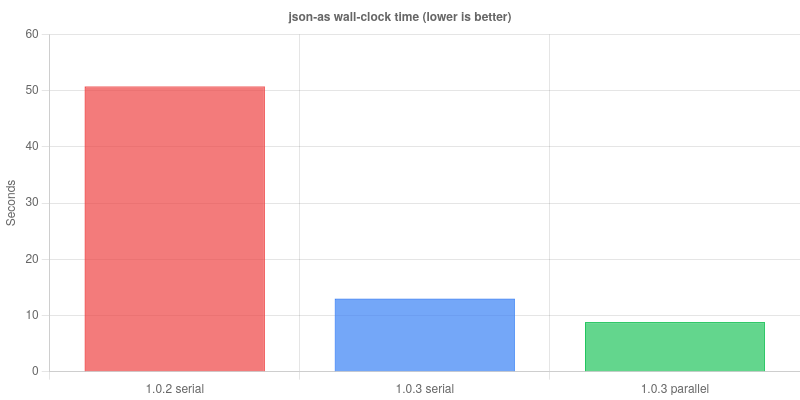
Parallelism only becomes useful once the fixed overhead is addressed. If every build still spins up a fresh compiler process, you end up doing the same expensive work repeatedly. Reusing compiler workers keeps the compiler warm and removes that cost, which is what allows parallel execution to actually reduce wall-clock time.
Where this setup helps most
describe("escapeString", () => {
  test("escapes quotes", () => {
    expect(escapeString(`"hello"`)).toBe(`\\"hello\\"`);
  });

  test("escapes control characters", () => {
    expect(escapeString("\n\t")).toBe("\\n\\t");
  });
});
This approach is especially useful for code that deals with parsing, serialization, binary formats, Unicode, protocols, and other low-level transformations. These are the kinds of systems where small mistakes are easy to miss and expensive to debug later.
The shape that feels right
- specs for known behavior
- snapshots for structured output
- targeted mocks for runtime edges
- fuzzing for unexpected inputs
- multiple runtime modes for real environments
That tends to be the balance that works. It is not about making AssemblyScript feel like JavaScript. It is about giving it a testing workflow that matches how it is actually used.
Comments